Information architecture, user journeys and responsive wireframes¶
Issues: #56, #581
This document defines the navigation structure, the main user journeys, and low-fidelity responsive wireframes for Stat'sTheGame. It covers presentation and flow only; it does not change the access model, the event/statistic domain, or the API contract, and it must stay consistent with the approved brand and interface guidelines. Wireframes are intentionally low-fidelity (structure and content, not final visual styling) so the team can review flow and states before detailed page implementation begins.
1. Scope and audiences¶
Four audiences use the same application, distinguished by app_user.application_role and,
for submitters, submitter_competition_scope (see
Roles and permissions):
| Audience | Sign-in required | Role |
|---|---|---|
| Public visitor | No | Unauthenticated |
| Signed-in viewer | Yes | viewer (default for any new account) |
| Approved submitter | Yes | submitter, scoped to specific competitions |
| Administrator | Yes | admin |
The frontend may use role/scope to decide what to show, but — consistent with the security boundary in the roles document — frontend visibility is never the security boundary; every wireframe below assumes the backend re-checks role and scope on every request.
2. Information architecture¶
2.1 Site map¶
The current application separates stable public navigation from Account and role-specific
Manage Submission navigation. Public browsing routes require no session; submission routes require a
submitter or admin; review and administration routes require an admin. The backend remains
the authorization boundary.
flowchart TD
    Home["/ — Landing"]

    subgraph Public["Public product (no sign-in)"]
        Api["/api — API Explorer"]
        Competitions["/competitions"] --> CompetitionDetail["/competitions/:id"]
        Seasons["/seasons"] --> SeasonDetail["/seasons/:id"]
        Fixtures["/fixtures"] --> FixtureDetail["/fixtures/:id"]
        FixtureDetail --> FixtureStats["/fixtures/:id/statistics"]
        FixtureDetail --> FixturePlayers["/fixtures/:id/players"]
        FixtureStats --> FixtureStatDetail["/fixtures/:id/statistics/:statisticId"]
        Competitors["/competitors"] --> CompetitorDetail["/competitors/:id"]
        Participants["/participants"] --> ParticipantDetail["/participants/:id"]
        Releases["/dataset-releases"] --> ReleaseDetail["/dataset-releases/:version"]
    end

    subgraph Auth["Authentication"]
        SignIn["/sign-in"] --> Callback["/auth/callback"]
        Callback --> Account["/account/overview"]
        Account --> AccountAccess["/account/access"]
        Account --> AccountSecurity["/account/security"]
    end

    subgraph Submitter["Manage Submission — submitter/admin"]
        Submit["/submissions/new"]
        SubmissionHistory["/submissions/batches"] --> SubmissionReport["/submissions/batches/:batchReference"]
    end

    subgraph Admin["Administrator (role: admin)"]
        ReviewQueue["/reviews/batches"] --> ReviewDetail["/reviews/batches/:batchReference"]
        Administration["/admin"]
        AdminUsers["/admin/users"]
        AdminConsumers["/admin/api-consumers"] --> AdminConsumerDetail["/admin/api-consumers/:consumerId"]
        PublishRelease["/admin/dataset-releases/new"]
        Administration --> AdminUsers
        Administration --> AdminConsumers
        Administration --> PublishRelease
    end

    Home --> Competitions
    Home --> Fixtures
    Home --> Seasons
    Home --> Competitors
    Home --> Participants
    Home --> SignIn
    Home --> Api
    Submit --> SubmissionHistory
    NotFound["* — 404 Not Found"]
2.2 Navigation rules¶
- The global header remains stable before and after sign-in: Explore Data (Fixtures,
Competitions, Seasons, Teams, Players), Downloads, and API. API links directly to the
internal
/apiexplorer. - The header shows Sign in for an unauthenticated visitor, and Account (leading to
/account/overview) once authenticated. - Downloads exposes the public dataset-release catalogue to every audience without requiring a session.
- Account contains Overview, Access, and Settings. It is not the launcher for private product workflows.
- A submitter Manage Submission menu exposes Submit data, My submissions, and Access & scope. An administrator Manage Submission menu exposes Submit data, Submission history, and Review. Administration is a separate administrator-only navigation item.
- Administration organises Users & access, API consumers, and Data governance surfaces. Review decisions remain administrator-only; no reviewer application role exists.
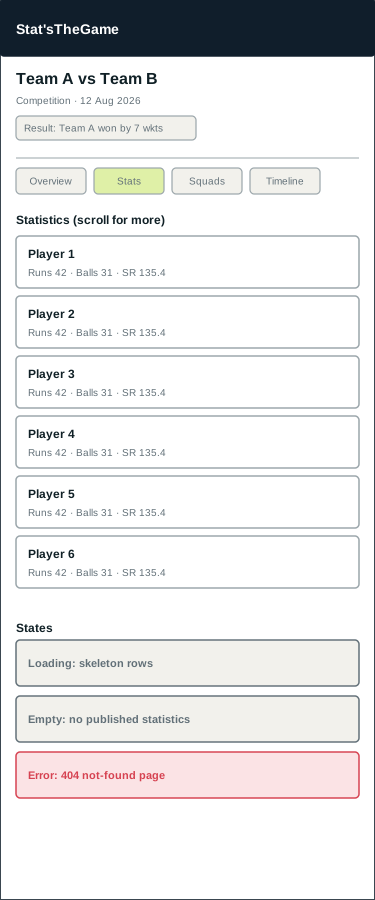
- The mobile menu exposes the same public and permitted Manage Submission destinations as labelled direct links, without depending on icon recognition or nested entity grids.
- Protected deep links carry a validated internal return path through sign-in. External and protocol-relative return targets are rejected.
- Deep links to any public detail page (
/fixtures/:id,/participants/:id, etc.) work directly, without first visiting the list page, since these are the URLs likely to be shared or indexed. - An unknown path, or a public ID that does not resolve, renders the shared 404 page rather than redirecting silently.
The navigation, Account/Manage Submission separation, and route additions in this section supersede older account-launcher wording in the original issue #56 journey diagrams below. Those diagrams remain useful as task-state wireframes and do not change backend role or scope semantics.
2.3 Content hierarchy per page type¶
| Page type | Hierarchy |
|---|---|
| API Explorer | Page title → version/resources → public/consumer/application access guide → operation explorer |
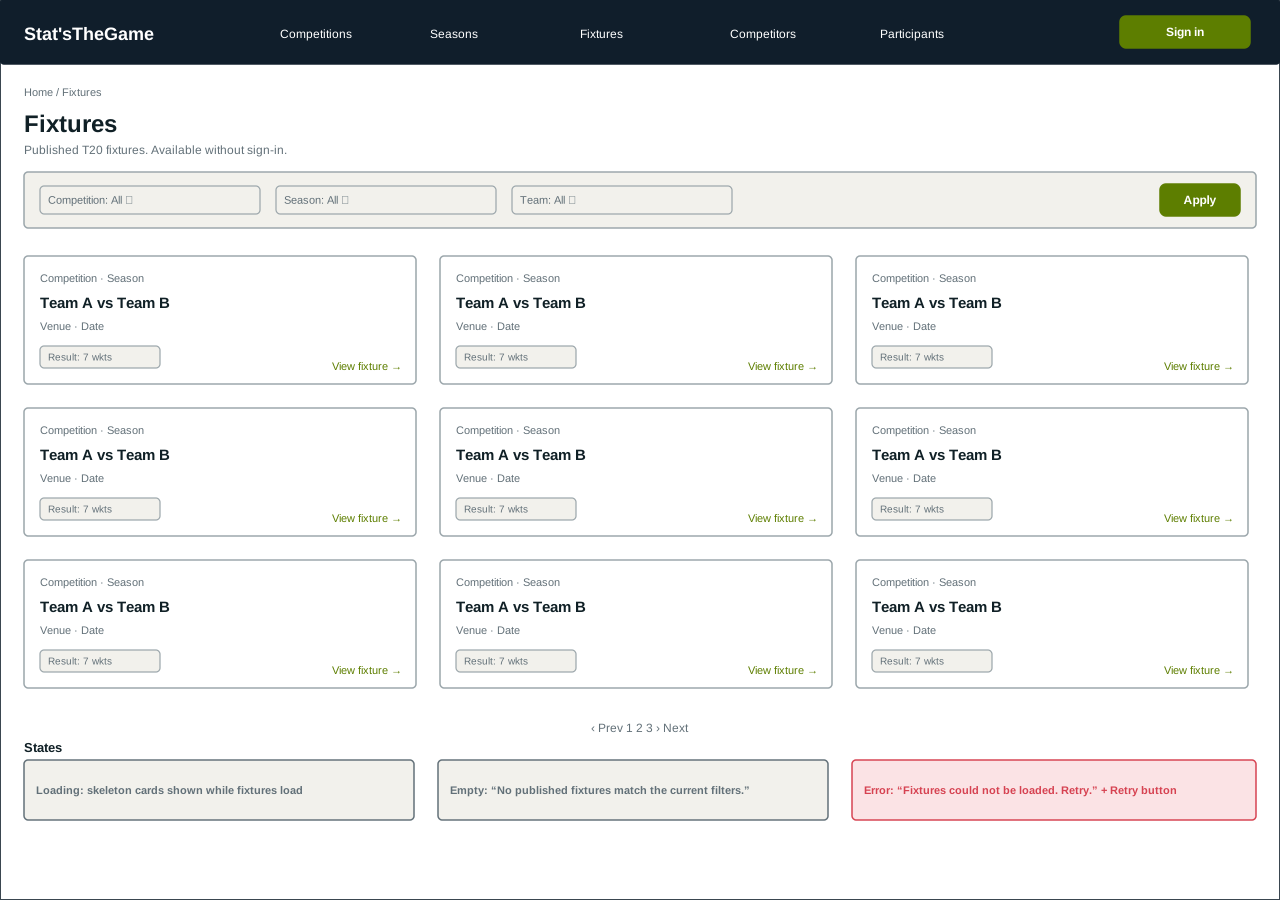
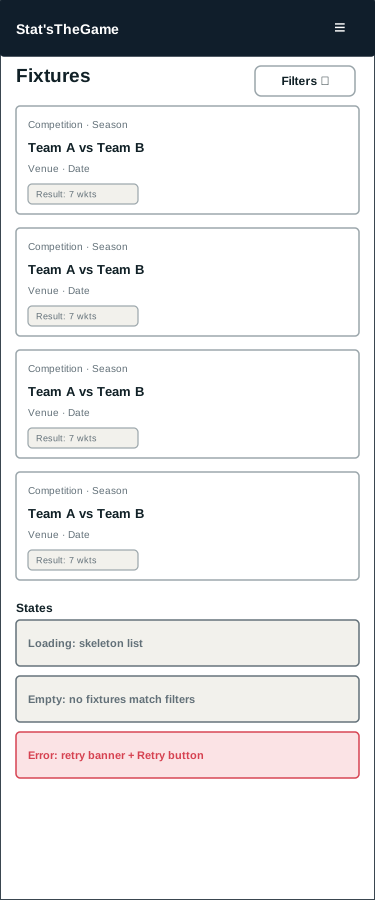
| List page (e.g. Fixtures) | Page title → filters → paginated card/row grid → pagination |
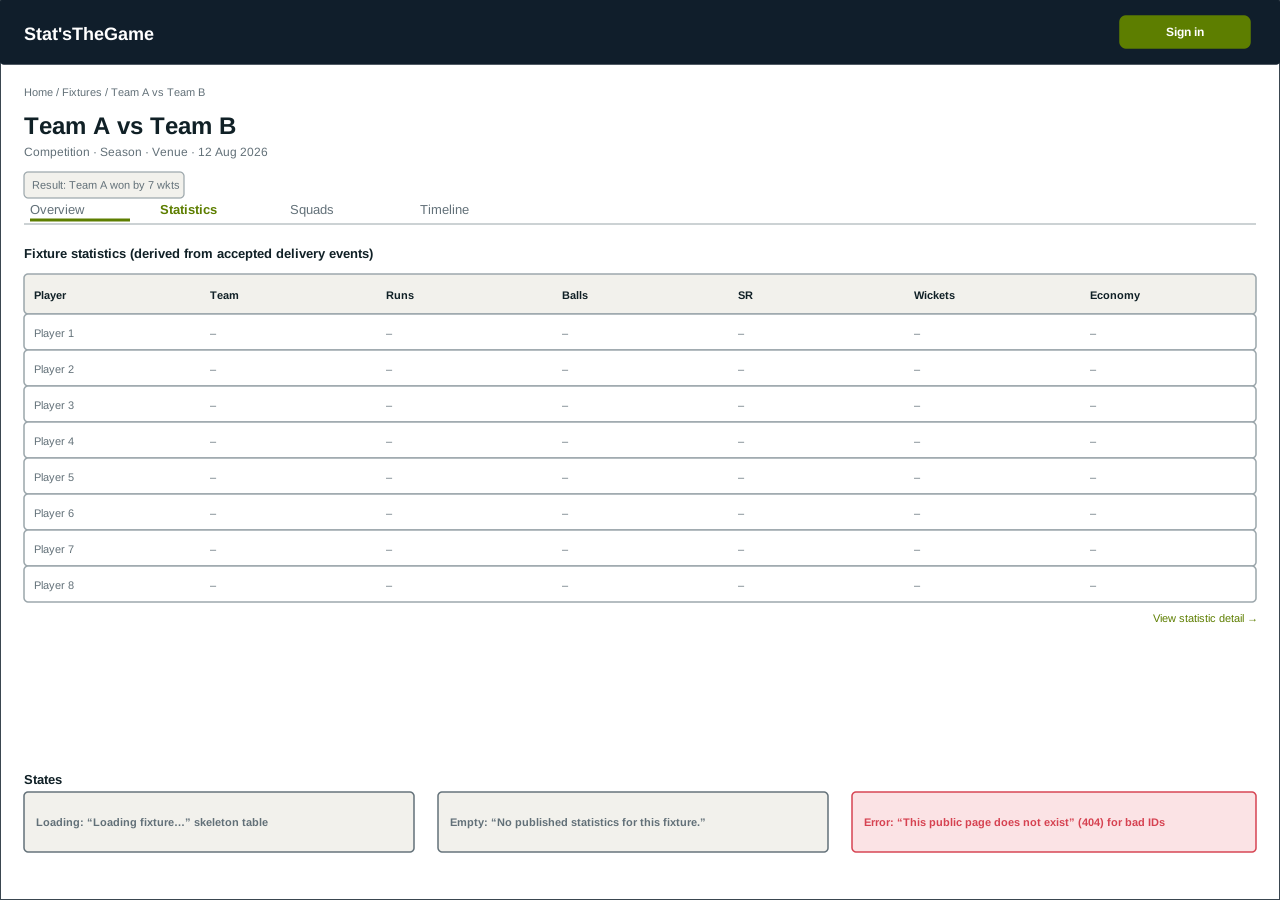
| Detail page (e.g. Fixture) | Breadcrumb → title/summary → tabs (Overview / Statistics / Squads / Timeline) → tab content |
| Form page (Submission) | Title → scope/help copy → single-column form → primary action → result region |
| Admin page | Title → one card per account → request state → scope controls → role-transition actions |
3. User journeys¶
3.1 Public visitor — browse fixtures, events and statistics without an account¶
Confirms the acceptance criterion that public fixture, event and statistic pages are reachable without sign-in.
flowchart LR
    A[Land on Home] --> B[Open Fixtures]
    B --> C{Filter by competition/season/team?}
    C -- yes --> B
    C -- no --> D[Open a fixture]
    D --> E[View fixture Overview]
    E --> F[Open Statistics tab]
    F --> G[Open a statistic detail]
G --> H[Open a linked participant or competitor]- No step in this journey requires authentication; Sign in remains visible but is never forced.
- Every list and detail page independently handles its own loading, empty and error states (§4), since the visitor may deep-link directly into any page.
3.2 Signed-in viewer — request submitter access¶
flowchart LR
    A[Sign in with Google] --> B[Land on /auth/callback]
    B --> C[Redirected to /account]
    C --> D[Request submitter access for a competition]
    D --> E{Administrator decision}
    E -- approved --> F[Role becomes submitter; scope assigned]
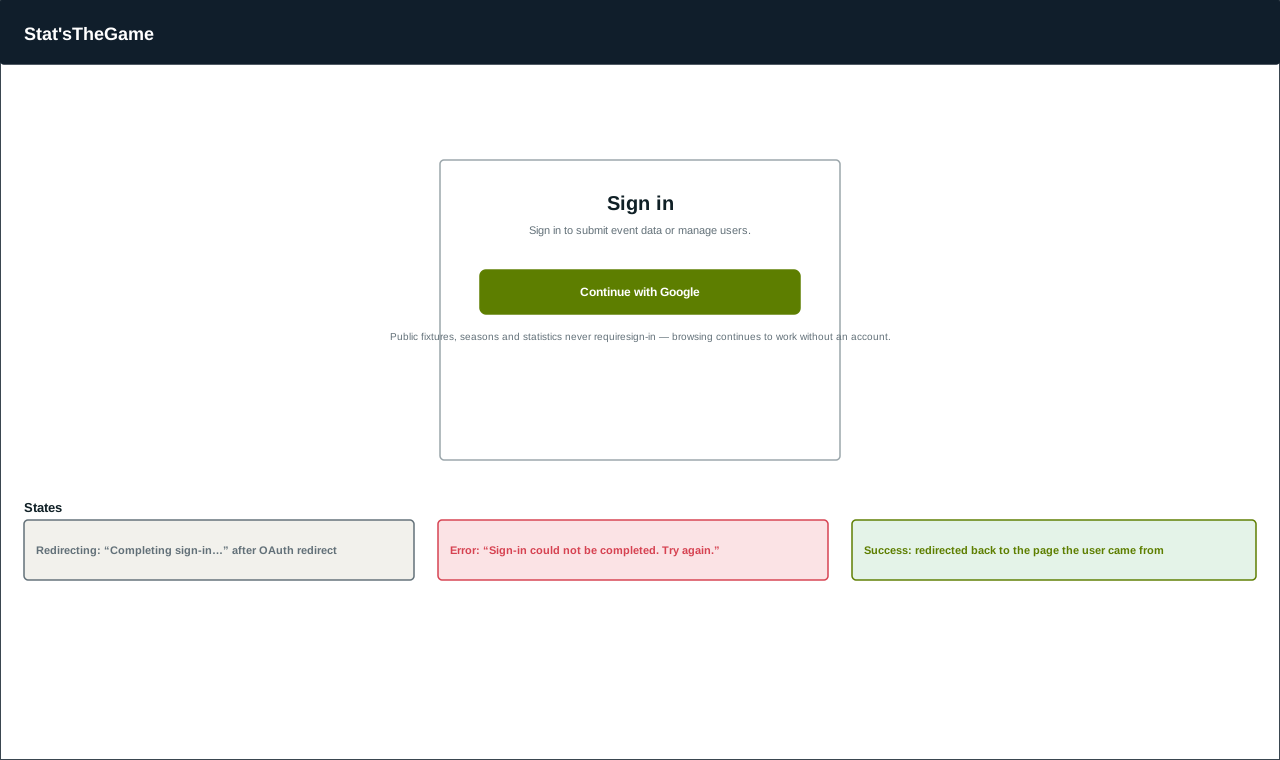
E -- rejected --> G[Stays viewer; may request again]- Authentication is Supabase Auth with Google OAuth (per System architecture); the frontend never assigns a role itself.
- A pending request is visible on the account page as "Pending review"; the account remains a
viewer— and therefore cannot submit — until an administrator approves it.
3.3 Approved submitter — submit fixture, season or back-catalogue events¶
flowchart LR
    A[Open Submit events] --> B{Choose submission scope}
    B --> C[Single fixture]
    B --> D[Season]
    B --> E[Back catalogue]
    B --> F[Advanced technical JSON]
    C --> G[Choose readable fixture and package]
    D --> H[Choose competition and season context]
    E --> I[Choose competition context]
    F --> J[Choose fixture and paste canonical events]
    G --> K[Upload and receive durable receipt]
    H --> K
    I --> K
J --> L[Validate and store synchronously]- The page is opened by the account area's single Submit events action. The legacy batch-upload URL redirects here and no second upload action is presented.
- Fixture, competition and season choices are only those returned for the account's backend-owned scope. Single-fixture packages are checked against the selected date and team names before upload.
- When a reviewer returns a season batch for correction, its report and submission-history entry provide the replacement action. The normal season form identifies the original batch, locks its competition choice and preserves navigable original-to-replacement history after upload.
- Final statistic totals are never entered directly; they are always derived from accepted events, consistent with the event-sourced design in the system architecture.
- On rejection, focus moves to the result heading and every field-level reason is listed, so the submitter can correct and resubmit without losing their pasted JSON.
3.4 Administrator — approve, reject or revoke submitter access¶
flowchart LR
    A[Open Manage users] --> B[Find account with pending request]
    B --> C[Select one or more competition scopes]
    C --> D[Approve and assign scope]
    D --> E[Role becomes submitter; scope saved]

    B --> F[Reject pending request]
    F --> G[Role stays viewer; may request again later]

    H[Find approved submitter] --> I[Revoke]
    I --> J[Role reverts to viewer; scope cleared]
    H --> K[Change competition scope]
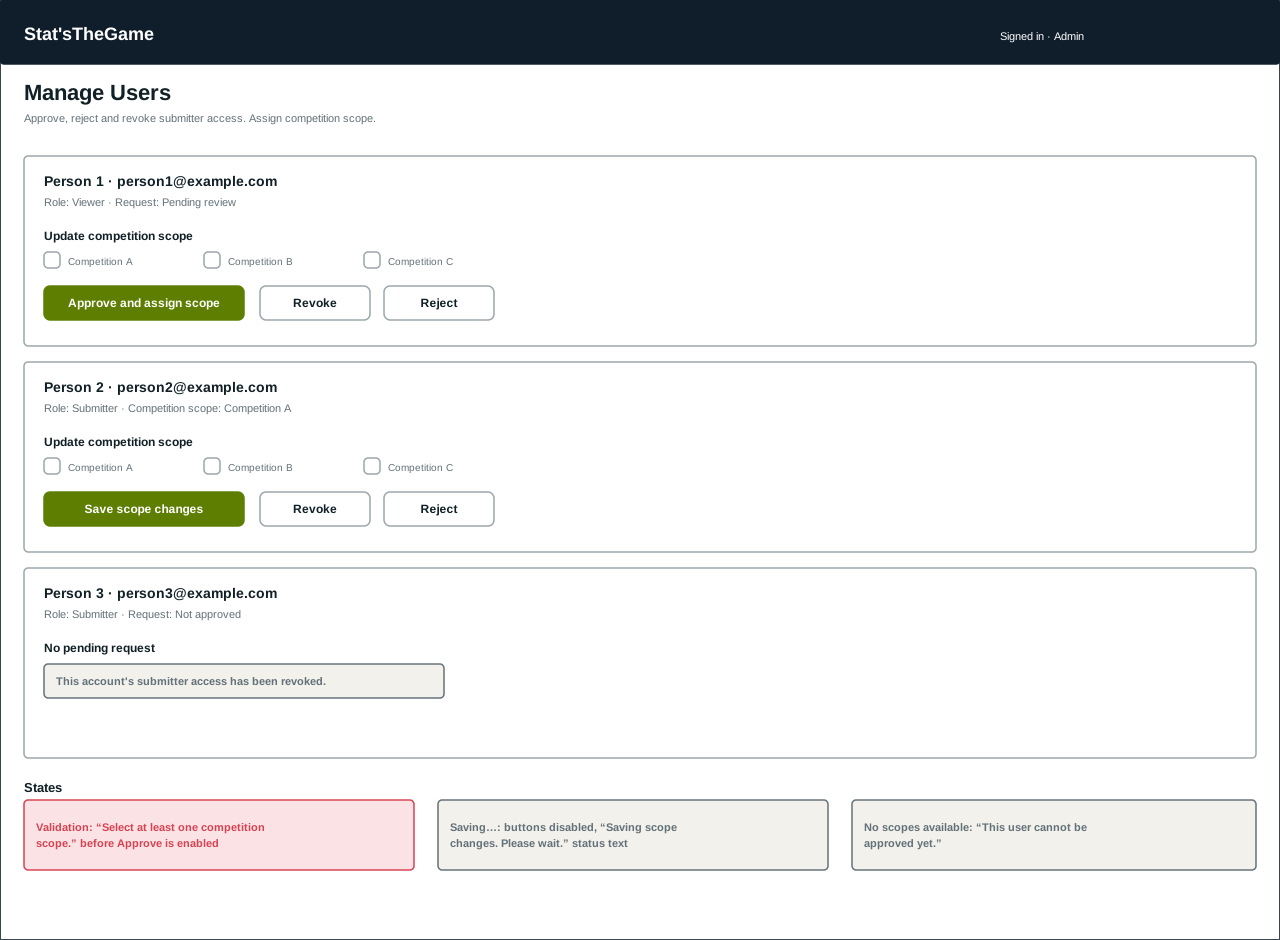
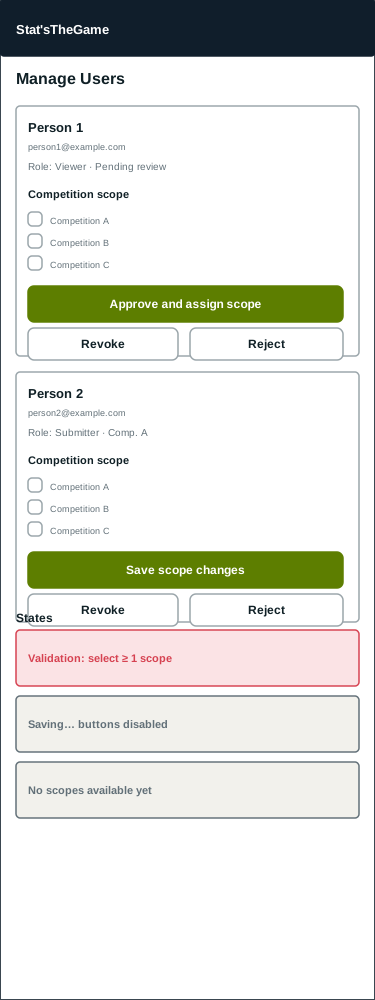
K --> L[Save scope changes]- Approval and scope assignment happen as one action; approval is blocked until at least one scope is selected (§4 validation states).
- Rejection, revocation and scope changes are separate, permitted only for the lifecycle states the backend allows (pending → approved/rejected; approved → revoked/rescoped) — an administrator cannot approve their own account or an already-admin account.
- Every transition is visible immediately in the account's card; no page reload is required.
3.5 Administrator — generate and publish a dataset release¶
flowchart LR
    A[Open Account] --> B[Choose Publish dataset release]
    B --> C[Review immutable public-action warning]
    C --> D[Enter a stable release version]
    D --> E{Version valid?}
    E -- no --> F[Correct focused validation feedback]
    E -- yes --> G[Generate and publish snapshot]
    G --> H[View metadata and checksum]
H --> I[Open public detail, download or catalogue]- The workflow verifies the current application role before rendering its form; frontend visibility supplements rather than replaces the backend administrator guard.
- Publication is presented as an immediate public and immutable operation. Reusing a version returns its existing release, while corrections require a new version.
- Validation and request failures retain the entered version. Successful publication moves focus to the result containing creation time, event count, checksum and public follow-up links.
4. States considered per page¶
Every list, detail, form and admin page in this document is designed against the same four states, shown as annotated strips beneath each wireframe in §5:
| State | Pattern used across pages |
|---|---|
| Loading | Skeleton/placeholder content in place, with a status-role announcement (e.g. "Loading fixture…", "Checking submission access") for assistive technology. |
| Empty | A specific, non-alarming message naming what is absent (e.g. "No published fixtures match the current filters.", "No in-scope fixtures.") rather than a generic blank page. |
| Validation | Errors surface next to the offending field where the field is identifiable, plus a summary region that receives focus (submission and admin-approval forms). |
| Error | An alert-role message distinct from "empty" (e.g. failed fetch vs. genuinely no data), with a retry action where the failure is retryable. Unresolvable public IDs render the shared 404 page rather than an error banner. |
5. Responsive wireframes¶
Wireframes are intentionally low-fidelity (structure, hierarchy and states — not final visual
styling, which is governed by the brand and interface guidelines). Desktop
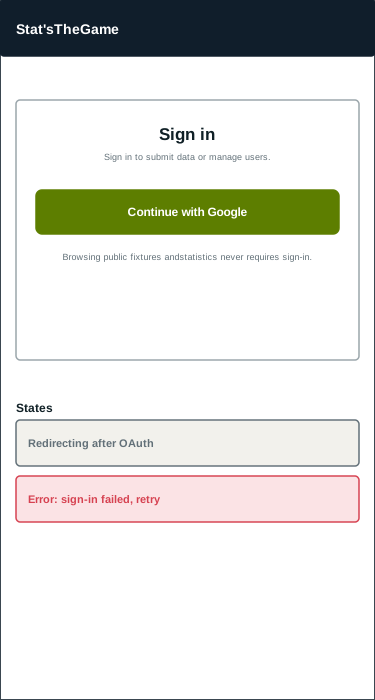
frames are shown at a 1280px reference width; mobile frames at a 375px reference width. Source
SVGs are stored in docs/design/assets/wireframes/ and can be reopened and edited directly.
5.1 Home (public)¶
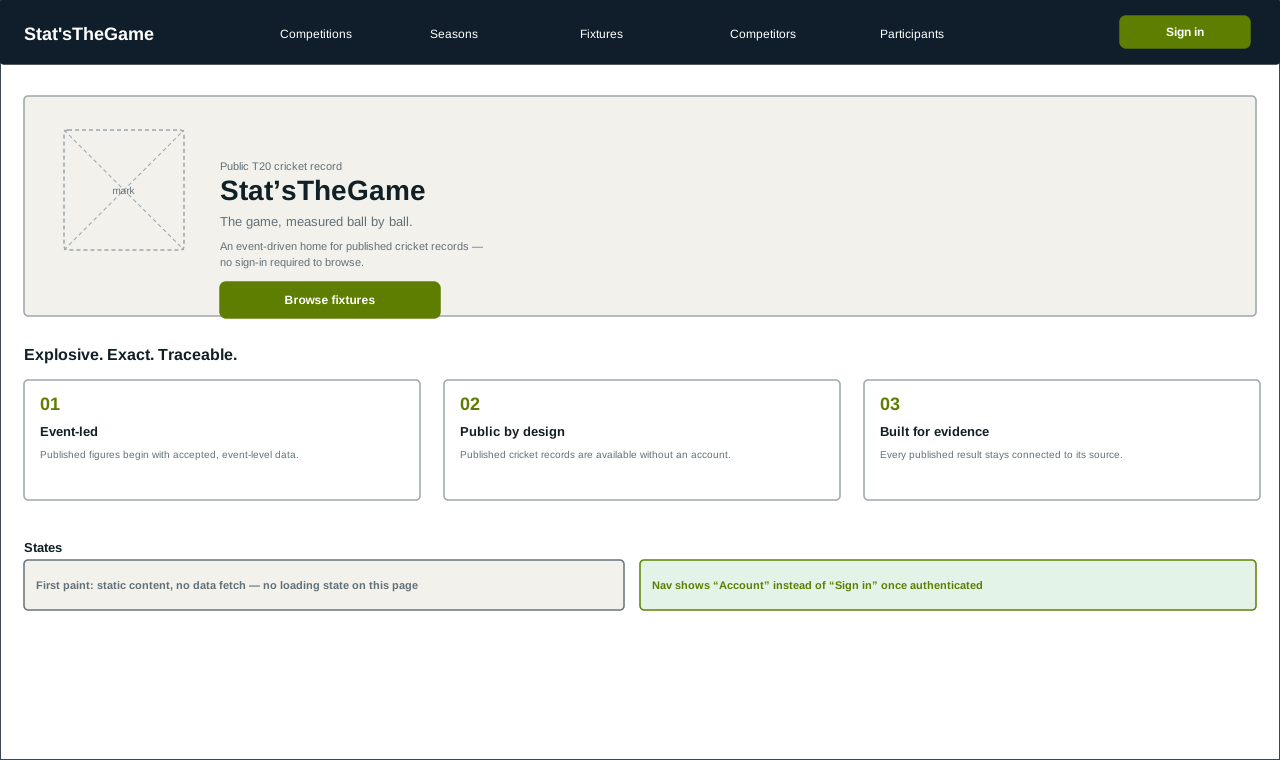
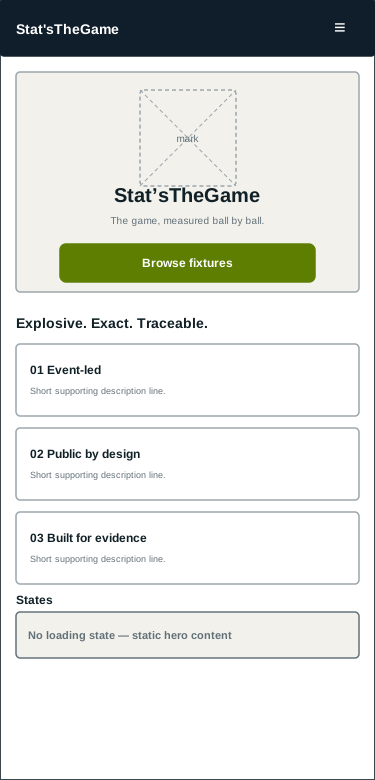
Landing page — static hero and principles content; no data fetch, so no loading state applies.
Issue #314 extends the approved low-fidelity structure into an editorial landing-page narrative:
- one headline and immediate links to Fixtures and Competitions, with Players at lower emphasis;
- the Explosive, Exact and Traceable principles presented as a paced broadcast-style sequence;
- a semantic delivery-to-statistic example using supported
runs.offBat, extras, team-total and player-statistic relationships; - public gateways to Fixtures, Competitions, Players and Teams;
- a restrained technical section containing only implemented public API paths; and
- a final return to public fixture browsing.
The hero's moving delivery is explicitly illustrative because the source model contains no physical ball trajectory or pitch-location coordinates. The SVG fallback carries the same event-to-derived value idea at first paint, with reduced motion, without WebGL, or if the lazy Three.js enhancement cannot load. Mobile stacks copy before a simplified visual rather than shrinking the desktop split.
5.2 Fixtures (public list)¶
Filterable list of published fixtures. Available without sign-in.
5.3 Fixture detail and statistics (public detail)¶
Tabbed detail page; the Statistics tab is what published event-derived statistics roll up into.
5.4 Sign in¶
Single sign-in method (Google, via Supabase Auth), reached from any page's header.
5.5 Submit delivery events (submitter)¶
One page at /submissions/new presents four labeled scopes: single fixture, season, back catalogue,
and advanced technical JSON. It is reached from the account area's Submit events action; the old
/submissions/batches/new URL redirects to it. The fixture selector presents date, teams,
competition, season and match type instead of database IDs, while season and catalogue modes use
readable competition and season context. Supported formats, the 50 MB and 50,000-event limits,
required readable fields, and the shared JSON/spreadsheet templates precede each file control.
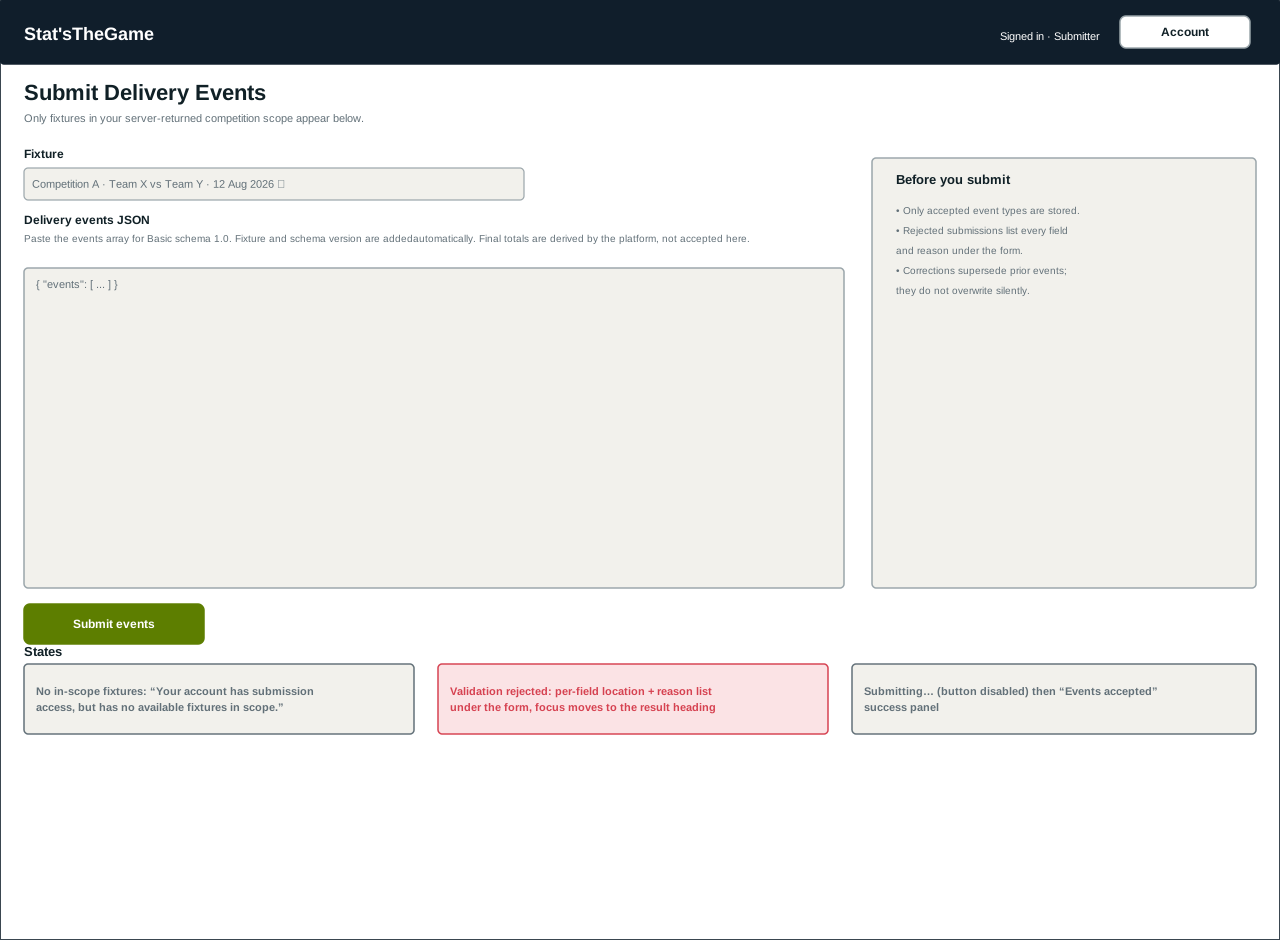
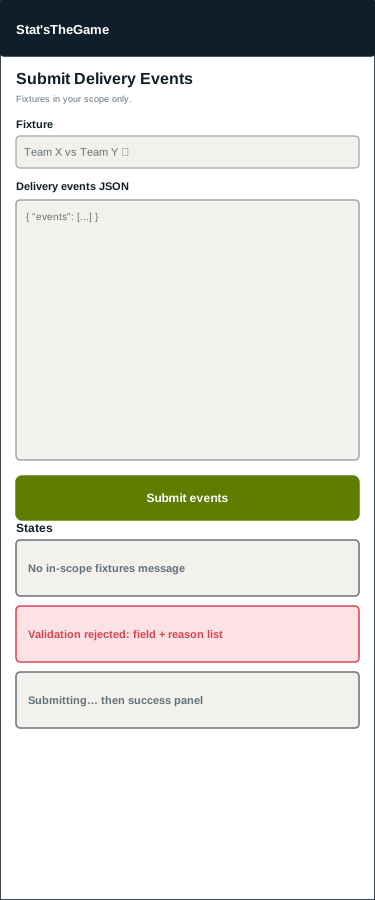
All guided package scopes use the same durable batch receipt, background processing, readable report and reference-mapping path. Single-fixture mode accepts JSON and CSV and verifies that exactly one fixture's date and teams match the readable selection. Season and back-catalogue modes additionally accept NDJSON. The advanced canonical JSON editor and accepted-event correction workspace remain available for integrations that already hold application references.
The single-fixture workflow presents a separate Propose a new fixture action for an approved
submitter, rather than placing it among existing fixture choices. Proposal mode hides the
existing-fixture selector and provides a clear return action. It collects the required fixture
metadata and converts a matching JSON or CSV package to the version 1.1 proposal contract. When the
proposal's competition, season, date and two team names match an accessible existing fixture, the
browser warns the submitter and offers to use that fixture instead. Canonical creation remains an
administrator decision in the batch review workspace, and the submission is revalidated after that
decision. Enumerated fixture metadata uses dropdowns:
match type is fixed to the platform's supported T20 value, team type offers club and
international, and gender offers female and male.
The file control precedes the new-fixture metadata and prefills competition, season, date and teams
from the selected package so the submitter does not re-enter context already present in the file.
An indeterminate upload indicator covers transfer time, then an accessible durable-receipt panel links to submission history. History and detail views use plain-language lifecycle descriptions, source row/field links, downloadable complete reports and labeled reference-mapping controls. Validation failures name readable fields and explain the next corrective action instead of leading with schema paths or rule codes; those identifiers remain available in collapsed Technical details for debugging and support. Empty, partial, unavailable and error states retain the standard state patterns in §4. Background processing does not depend on the page remaining open.
The implemented workflow and its desktop/mobile accessibility journey are ready to be exercised by the formal submitter-testing activity tracked under #417. Issue #361 does not record a separate participant session.
5.6 Manage users (administrator)¶
One card per account; scope selection and role-transition actions gated by current lifecycle state.
5.7 Publish dataset release (administrator)¶
The responsive form follows the shared admin-page hierarchy: permission-check state, a prominent immutable-publication warning, one labelled version field, one primary publish action and a focused result region. On narrow screens, controls and result links become single-column and long checksums wrap without horizontal page overflow.
5.8 Manage API consumers (administrator)¶
The Administration entry point opens a responsive list and creation form. The consumer detail view shows safe configuration, key prefixes and lifecycle dates, with explicit confirmation for key rotation and individual-key revocation. Raw keys appear only in the in-memory one-time view returned by creation or rotation and disappear when that view is dismissed. Both pages link to the public API Explorer rather than reproducing the OpenAPI documentation. The detail view also presents owner-scoped historical usage by inclusive UTC date window, normalized operation, response status class and request count. It distinguishes empty usage from a loading failure and labels configured quota/rate policy as context rather than current remaining capacity. No consumer secret is required.
6. Open questions for review¶
- Should the public site expose a global search across fixtures/competitors/participants, or is filtered browsing on each list page sufficient for the current scope?
- Does the account page need a visible history of past submissions, or is that deferred to a later issue?
- Confirm pagination style (numbered pages vs. "load more") for large public lists before implementation.
7. Review and sign-off¶
| Reviewer | Decision | Date | Notes |
|---|---|---|---|
This document is merged through the Pull Request referenced by Closes #56, per the project's
git methodology. Detailed page implementation should not begin until this document has been
reviewed by the team, per the acceptance criteria on #56.
The issue #266 guided file-submission interface was documented with the assistance of Codex[GPT-5]. The issue #314 homepage narrative, illustrative-trajectory constraint and progressive fallback were documented with the assistance of Codex[GPT-5.6 Sol]. The issue #361 guided batch-upload workflow was documented with the assistance of Codex[GPT-5]. The issue #435 guided single-fixture upload alignment was documented with the assistance of Codex[GPT-5]. The issue #437 unified submission workflow was documented with the assistance of Codex[GPT-5]. The issue #458 administrator dataset-release workflow was documented with the assistance of Codex[GPT-5.6 Sol]. The issue #499 plain-language submission validation guidance was documented with the assistance of ChatGPT-Web[GPT-5.6 Sol]. The issue #539 correction-resubmission journey was documented with the assistance of Codex[GPT-5]. The issue #571 new-fixture proposal journey and its issue #583 duplicate-warning refinement were documented with the assistance of Codex[GPT-5]. The issue #581 navigation, Account/Manage Submission separation, local navigation and safe authentication return-path implementation were documented with the assistance of Codex[GPT-5.6 Sol]. The issue #775 administrator API-consumer information architecture was documented with the assistance of Codex[GPT-5.6 Sol]. The issue #776 administrator consumer-usage information architecture was documented with the assistance of Codex[GPT-5.6 Sol]. The issue #783 public API consumer-onboarding hierarchy was documented with the assistance of Codex[GPT-5].